WT32-SC01 Plus desk companion: clock, weather and internet radio on an ESP32-S3 touchscreen
Gadget, Medium
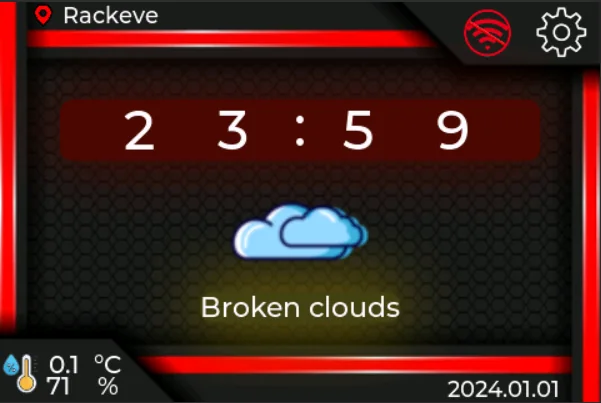
Open-source firmware that turns the WT32-SC01 Plus 3.5-inch ESP32-S3 touch display into a desk clock with live weather, an online radio player and on-screen settings.
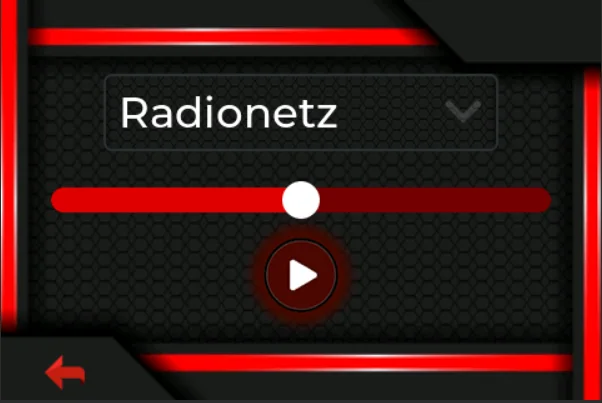
This project by SubCoderHUN turns the WT32-SC01 Plus, an ESP32-S3 module with a 480 x 320 capacitive touch screen, into a small desk companion. It shows the time and current weather from OpenWeatherMap, plays online radio streams through an optional I2S amplifier and speaker, and lets you set Wi-Fi, city, station and brightness (including a brightness schedule) on the touchscreen. Settings are saved to EEPROM so they survive a reboot, and an optional microSD card can keep a log.
The interface is built with LVGL and LovyanGFX, and the repo includes the SquareLine Studio project file, so you can redesign the screens visually and export new LVGL sources.
Hardware & cost: A WT32-SC01 Plus, a USB-C data cable, and optionally an I2S amplifier with a speaker and a microSD card. You'll need your own OpenWeatherMap API key. Apache-2.0 licensed.
Difficulty: Medium. Build and flash with PlatformIO in VS Code.
Agent install prompt (paste into Claude Code, Cursor or Codex): "Clone https://github.com/SubCoderHUN/WT32-SC01-PLUS, open it with PlatformIO, set my OpenWeatherMap API key in weather.cpp, check the serial port in platformio.ini, then build and upload to my WT32-SC01 Plus. Ask before flashing."
Source: SubCoderHUN/WT32-SC01-PLUS on GitHub, https://github.com/SubCoderHUN/WT32-SC01-PLUS (facts checked against the project README, Oct 2026).
Found via Joseph Zhou's AI Hardware list (https://josephzhou.me/ai/).
Quick answers
- What do you need to build WT32-SC01 Plus desk companion?
- A WT32-SC01 Plus, a USB-C data cable, and optionally an I2S amplifier with a speaker and a microSD card. You'll need your own OpenWeatherMap API key. Apache-2.0 licensed.
- How hard is WT32-SC01 Plus desk companion to build?
- Medium. Build and flash with PlatformIO in VS Code.
How your agent drives it
Copied from the SubCoderHUN/WT32-SC01-PLUS README
- Shell
$ pio run --target upload
Any coding agent that can run a shell can run these. Read the README before you run anything on a robot that moves.
Ideas to try with it
Our ideas, not the builder's claims.
- Add a screen that shows whether your agent's last job passed
- Swap the radio for a focus-music stream during work hours
- Use the free GPIOs for a desk sensor and show it next to the weather
- Last commit
- 2025-10-26
- Builder
- SubCoderHUN
- Repo
- SubCoderHUN/WT32-SC01-PLUS, 38 stars
- Built with
- ESP32
Links
What to build next
Builds that share a board, robot or agent with this one.
 emini Home: a four-color e-paper poster of your day on the ZECTRIX NOTE4CAlso built on ESP32
 openHASP: build a touchscreen wall panel for Home Assistant from a cheap ESP32 displayAlso built on ESP32
 Reflect: a voice-and-light assistant on an M5Stack CoreS3Also built on ESP32
 Start with the Cheap Yellow Display: an ESP32 with a built-in touchscreen and a community of projectsAlso built on ESP32
 Turn an M5Stack StickS3 into a live-view remote for a RICOH GRAlso built on ESP32
 AWTRIX NG: turn a Ulanzi pixel clock into a notification display for your smart home and scriptsAlso built on ESP32